
Windows 11 – Es hora de un inesperado regalo de Navidad
El verano ya está aquí. Y con él, el anuncio de Microsoft sobre la nueva y esperada versión de su sistema operativo - Windows 11. Los usuarios de la versión anterior Windows 10, así como aquellos con máquinas más nuevas, tendrán la oportunidad de actualizar sus sistemas a más tardar para esta Navidad. Hasta entonces, se supone que la compañía irá lanzando poco a poco información sobre las nuevas características de su último sistema operativo.
Hoy les presentaremos en detalle las novedades de la versión 11 de Windows.
-
Requisitos del sistema
Para la mayoría de los usuarios, es fundamental cuánto espacio ocupará la próxima actualización del sistema operativo. Especialmente si no tiene suficiente espacio en el disco. Pero no se preocupe, no hay lugar para dramas. Al igual que en la versión anterior, en esta los requisitos están dentro de lo razonable, es decir:
-
Procesador: procesador de 64 bits con un mínimo de 2 GHz.
-
RAM: 4 GB
-
Espacio en disco: 64 GB
-
TPM 2.0
-
Soporte para DirectX 12
Si se pregunta qué es TPM, se trata de un microcontrolador que sirve para almacenar de forma segura diversas contraseñas, certificados de acceso o claves de cifrado. Así que, los usuarios que tienen computadoras ensambladas deben tener en cuenta que se requiere una configuración manual en el BIOS para activar la opción, que por defecto está desactivada.
Ha surgido información de que Acer y Dell afirman abiertamente en el espacio público que sus productos de modelos más antiguos tienen la capacidad de soportar el nuevo SO. Queda la pregunta sin respuesta de hasta qué punto los demás fabricantes han integrado el módulo TPM 2.0 en los modelos de sus placas base.
-
Nueva menú de Inicio

Uno de los cambios principales está en el menú de Inicio y los botones de Inicio, que ahora están posicionados en el centro de la pantalla, en lugar de estar a la izquierda como en versiones anteriores. Las “baldosas” quedan en el pasado, siendo reemplazadas aquí por íconos “vivos” y coloridos. Un adicional conveniente es que los programas están “disparados en la nube”, gracias a lo cual tiene la oportunidad de ver los últimos documentos en los que ha trabajado, así como las aplicaciones más utilizadas hasta el momento. Además, cuando migra un documento entre dos dispositivos, uno de los cuales es un dispositivo móvil, los cambios que realice se ven también en la computadora.
Otra característica que favorece el flujo de trabajo es la posibilidad de elegir entre diferentes opciones para dividir la pantalla, de modo que no necesitará comprar una nueva pantalla que requiera la instalación de software especial.
Se ha eliminado la barra de búsqueda de texto, y ahora el nuevo sistema operativo le “recomienda” usar el motor de búsqueda de Microsoft, Bing.
-
Nuevo Windows, nuevos “gadgets”
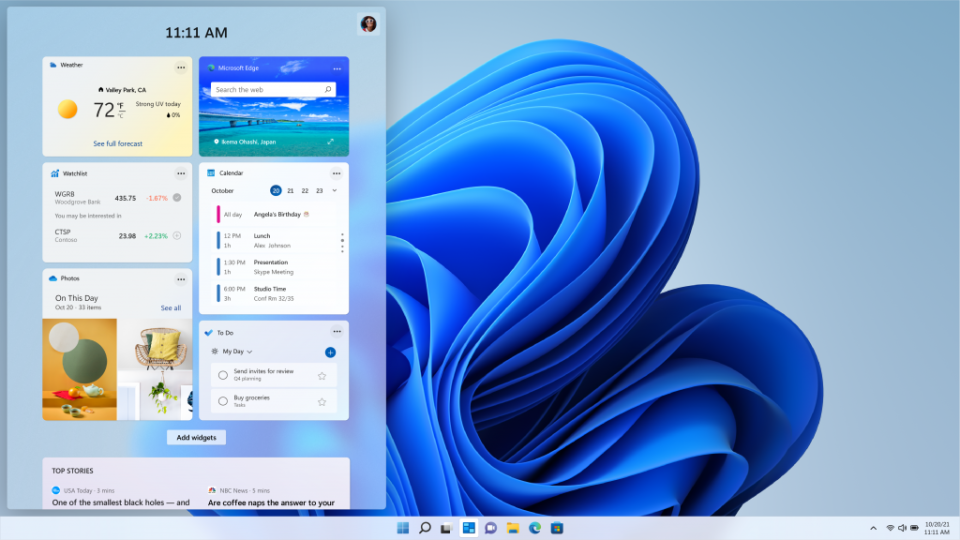
Aunque el SO Android ofrece una mayor variedad de juegos y aplicaciones, Microsoft tampoco se queda atrás en el cuidado de sus usuarios. Por eso, la compañía ha cambiado completamente el diseño de su tienda virtual, ofreciendo así una amplia gama de aplicaciones y juegos para sus usuarios. Además, se ha rediseñado completamente la barra de trabajo y meteorológica.
Las noticias también han sufrido cambios. Ahora puede personalizarlas, de modo que reciba solo la información del mundo que es importante para usted. Incluso tiene la opción de dar retroalimentación a los creadores del contenido que prefiere, para que pueda dar su opinión. Y esta es definitivamente importante para los desarrolladores.
-
Integración con otros ecosistemas
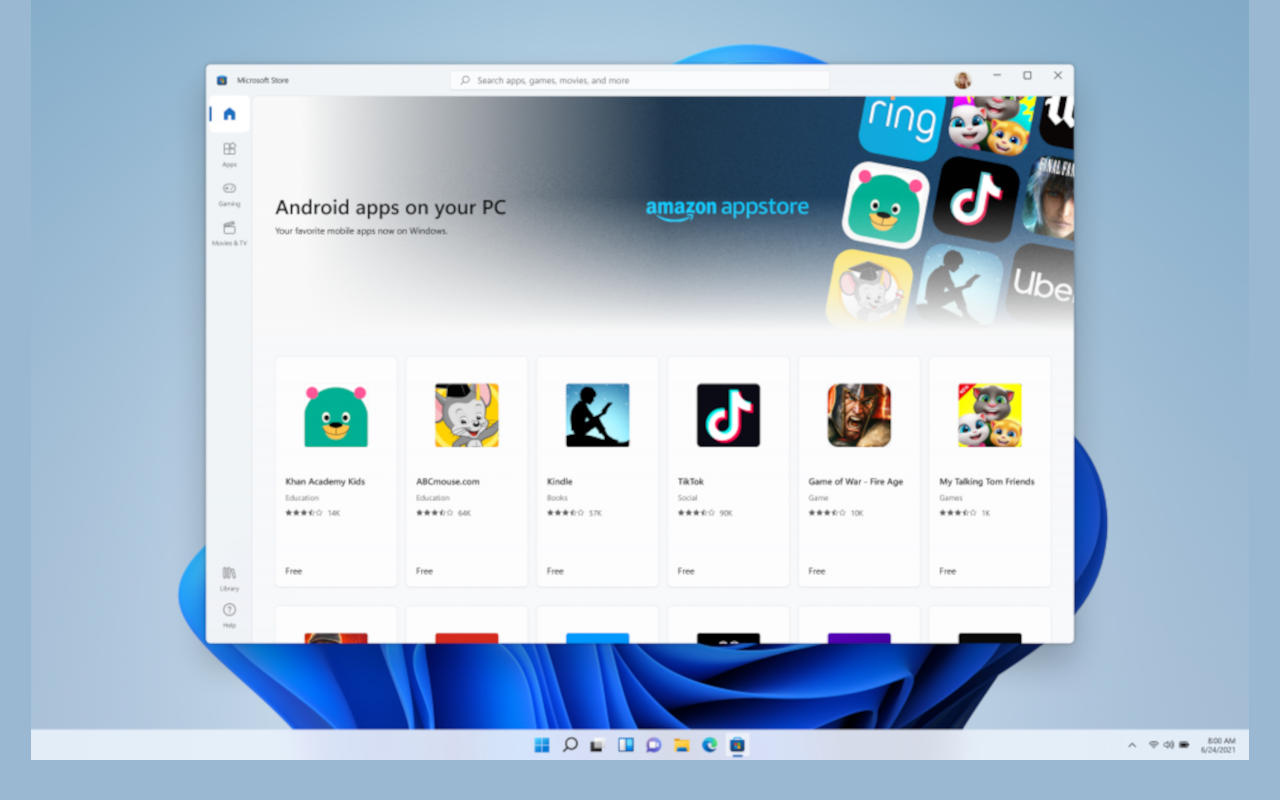
Microsoft es consciente de que actualmente uno de los sistemas operativos más extendidos es Android. Es por eso que en su nuevo sistema operativo, la compañía utilizará el compilador Intel Bridge que permite que las aplicaciones de Android funcionen en sistemas x86, incluidas las plataformas AMD. A través de él, podrá instalar, usar e incluso anclar en su escritorio sus aplicaciones de Android favoritas, que funcionarán de la misma manera sin problemas que las aplicaciones basadas en Windows.
Windows 11 también nos da WDDM3.0, lo que significa que podrá ejecutar aplicaciones gráficas de Linux en Windows con aceleración de hardware y sonido. Otra comodidad que obtenemos es un gestor de paquetes.
-
Estación de acoplamiento y escritorio

Puede usar una tableta o una computadora portátil que conecte a un monitor externo. Aquí hay una novedad. Ya no tendrá que preocuparse de que al desconectar la conexión, para ir a, por ejemplo, la sala de conferencias, perderá todo lo que se ha mostrado en la pantalla hasta ese momento.
Windows 11 ofrece la posibilidad de minimizar automáticamente las ventanas abiertas hasta ese momento hacia fuentes externas. Solo necesita desconectarse del dispositivo actual y conectarse al siguiente para que se muestren las aplicaciones o diagramas abiertos hasta ese momento.
Además, cada estación de trabajo puede ser personalizada según los deseos de los usuarios con su propia apariencia e íconos favoritos. Ahora, en las condiciones de trabajo desde casa, esta es una buena opción para dividir su propio “Yo” virtual: durante la mitad del día es el empleado que crea y trabaja en Excel, y por la noche su otro “Yo” rompe récords en Battlefield o en otro juego favorito.
-
Convierte tu ordenador doméstico en una Xbox virtual

Ya no tienes que dudar entre ensamblar un nuevo y potente ordenador para juegos o comprar una consola Xbox que ya es difícil de encontrar. Incluso si tu monitor no soporta HDR, cada juego cobra vida en colores reales. Ahora la compañía incorpora la misma tecnología que utiliza Xbox para ofrecer la imagen más detallada en tus sesiones de juego.
Los jugadores con acceso a Xbox Game Pass, ahora lo tendrán integrado en la nueva versión 11. Gracias al servicio en la nube “Xbox Cloud Gaming”, incluso las máquinas con capacidades más modestas se convertirán en consolas.
Otra novedad interesante es la introducción de la función “Direct Storage”, que será compatible con sistemas compatibles. Espera un artículo separado sobre el tema.
Editor: Grozdan Grozev
==============================================================
Tienda online de ordenadores para juegos, componentes y periféricos:
 https://www.pcbuild.bg
Síguenos en las redes sociales:


==============================================================

